
AI image recognition works best when the input image is clear, well lit, and easy to analyze. Even advanced systems can produce weaker results when an image is blurry, too dark, low in contrast, or cluttered with distracting background details. For websites and tools that identify objects, faces, celebrities, text, or sensitive content, image quality has a direct impact on speed and accuracy. This makes image preparation an important part of the recognition process. Many users focus only on the AI model itself, but the quality of the uploaded file often matters just as much. A simple improvement such as better lighting or a sharper photo can make a noticeable difference. Understanding how image quality affects recognition helps users get more reliable results from automated analysis. It also helps businesses create better workflows when large numbers of images need to be processed every day. Clear inputs support better outputs, and this principle applies across almost every use of computer vision.
Why image quality matters
Image recognition systems examine patterns in pixels to detect features such as shapes, edges, colors, textures, and text. When those patterns are hard to distinguish, the system has less useful information to work with. For example, a face partially hidden in shadow may be harder to analyze, and a text image taken at an angle may reduce OCR performance. Low resolution can also remove important details, making small objects or fine text difficult to detect. Compression artifacts may introduce visual noise that confuses the model. In practical use, this means the same tool can perform very differently depending on the image provided. Good image quality does not guarantee perfect recognition, but poor quality increases the chance of missed detections or incorrect classifications. This is especially important in applications such as document scanning, content moderation, product tagging, visual search, and identity-related image analysis. A better image creates a stronger foundation for every stage of AI-based recognition.
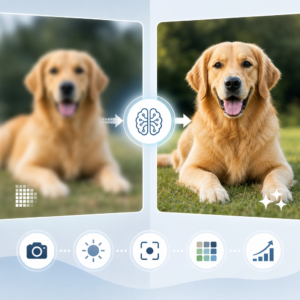
Several common issues reduce recognition quality. Blurry images are one of the most frequent problems because they soften edges and remove detail. Poor lighting can hide features or create strong shadows, while overexposure can wash out important areas. Busy backgrounds may make it harder to isolate the main subject. Incorrect framing can also affect results if the object, face, or text is too small in the image. For OCR, tilted documents, uneven lighting, and low contrast often reduce readability. For face or celebrity recognition, side angles, sunglasses, masks, or partial obstructions can limit detection. In object recognition, reflections, overlapping items, and unusual viewpoints may make classification harder. File quality matters as well, since repeated editing and heavy compression can lower image clarity. These issues are common in both personal and business use, but many of them can be reduced with simple adjustments before uploading the image to an AI tool.
Simple ways to prepare better images
Users can improve results by following a few basic image preparation steps. Start by using the highest practical resolution so the AI system has enough visual detail to analyze. Make sure the main subject is centered and large enough to be clearly visible. Use even lighting whenever possible, and avoid very dark scenes or strong backlighting. If the image includes text, keep the camera steady and capture the document from a straight angle. Cropping can help by removing unnecessary background elements and drawing attention to the area that matters most. In some cases, adjusting brightness or contrast improves visibility, but heavy editing should be avoided because it can change natural details. For face-related analysis, try to use images where the face is fully visible and not blocked by accessories or extreme shadows. For object recognition, choose images with clear separation between the object and the background. These basic habits can make AI recognition more consistent and dependable.
Businesses that rely on automated image analysis can benefit from building quality checks into their workflow. Instead of waiting for poor results, they can define minimum standards for image uploads, such as acceptable resolution, supported file formats, brightness levels, and framing requirements. E-commerce platforms may ask sellers to use plain backgrounds and multiple product angles. Document processing systems can guide users to capture scans with better alignment and sharper focus. Content moderation platforms may use pre-processing steps to improve consistency before running image analysis models. This type of quality control can reduce errors, improve user satisfaction, and save time by lowering the need for manual review. It can also support better scaling when thousands of images are processed each day. In many cases, the most effective way to improve recognition is not to make the AI more complex, but to improve the image entering the system. Good operational practices often produce strong practical gains.
Better images lead to better recognition outcomes
Improving image quality is one of the simplest and most effective ways to support better AI recognition. Whether the goal is to identify objects, detect celebrities, analyze faces, extract text, or flag NSFW content, the input image plays a major role in the final result. Clear, sharp, well-framed images help AI systems detect important patterns with less uncertainty. This leads to more useful outputs for individuals, businesses, and platforms that depend on visual analysis. As image recognition becomes more common across websites, apps, and business tools, image preparation will remain a valuable best practice. It helps users understand why one image works better than another and gives organizations a practical path to improve performance without changing their entire system. In everyday use, small quality improvements can have a meaningful impact. Better images do not just look better to people. They also help AI see more clearly.


